Wednesday, 27 April 2011

Evaluation

I made an PowerPoint presentation to display my evaluation. I have uploaded it to SlideShare.com and embedded it below:


View more presentations from 4cmackenzie.

Audience Feedback

To get a deeper understanding of how an audience would analyse our documentary we did some audience feedback. The documentary was shown to a range of sixth form students varying from drama to science students. We also had some media students from our class involved in the feedback. After showing them the documentary we then asked what they liked and disliked about the documentary. We explained by 'dislike' it could be what we should have done differently and could improve, rather than if they didn't enjoy the teacher involved etc.
Here is the audience feedback video we made with a digital camera and edited in iMovie:


Music


We used most of our music from GarageBand on the MacBook at school. It is easy to import music from GarageBand into iMovie so editing it in was simple. Unfortunately as the MacBook at school has difficulty connecting to the internet its software has not been updated recently. We found music on my more updated MacBook at home which was not on the school mac for a certain part of the documentary. By exporting it to an itunes file we were able to get it from my MacBook at home to the MacBook at school.
On GarageBand it is very easy to make a backing track for sections of the documentary. They go well with voiceovers and sequences of pictures or video. The use of sound makes it more interesting as from watching other peoples documentaries we saw that silence with images makes it look like a PowerPoint presentation and not a documentary/video.
The image below is from the music we made for when Mr Scully is being interviewed. It is
a loop of a sound clip we selected from one of many supplied by GarageBand in the sections on the left:

Supporting Pieces

Each group member had to make their own supporting ancillary piece, and then we all made one as a group.
As a group we originally planned to do an advertising pack. This advertising pack would include an advert for a magazine, billboard and bus stop. After we made the magazine advert as a group on the programme 'Fireworks' I then made the bus stop advert. Another group me
mber, Asia, made the third part of the pack - the billboard. We weren't happy with the way the advertising pack looked as it was very unprofessional looking and you could tell we hadn't spent as
much time gaining the skills we needed to produce good graphics. We then decided we weren't going to use these images anymore and planned to make a radio advert. We started by mind-mapping a few ideas on how to inform of a date and time that the documentary was on television without it being boring. Our final idea we feel is simple yet effective and was inspired by an army advert on the television. We wrote the script really quickly and got a group of people together in a quiet room to record it on GarageBand with the Yeti microphone. After recording a few times we were happy with the final result. It was then time to edit and add a backing track. We found the backing track on GarageBand along with a mechanical noise which sounds like a CCTV camera moving. We sped up some voices and changed the pitc
h of others. The idea was to make each voice sound different. The echo was added to emphasise the phrase 'they're always watching'. By emphasising this and after the words from the script the audience will be wondering what it is all about and ultimately watch it on television.

Making part of the advertising pack we used Microsoft Paint and FireWorks. I faded the flag to give it a more vintage look.


I chose to write a review for my personal ancillary piece. As I had never written a review before about anything, writing a review about a documentary I had made was quite challenging. After reading other reviews and understanding the main criteria needed, I produced a double-page spread review for a hypothetical magazine. I used the graphics that I made originally for the advertising pack that we didn't use to make the double page spread look more exciting. I also used a picture of a CCTV camera taken on the HD pocket camcorder and some stars as a rating system from the internet.


Anonymous Interview

To break up the Mr Scully interview we felt another interview was needed. It was only to be short but was to be about the content Mr Scully talks about. Unfortunately our actress wasn't available in the time frame we needed to film it. I had to take part and act as a school girl who had been bullied in the toilets. We used the media room to film with the HD pocket camcorder and tripod for our equipment. We decided that an anonymous interview would be a good convention to use at this point. It is frequently used when making documentaries as many people don't want their identity revealed. As we had practised interview techniques and editing them before we knew that it is hard to make it dark without having a plain black screen. By going in the media studies classroom and shutting the blinds and turning off the lights the room became pitch black. We then turned on a computer screen and sat a chair infront of it. I sat with my back to the light so my silhouette was shown. The screen shines blue light but we didn't feel this was a bad thing as my identity was hidden which is the aim.

Interview with Mr Scully

For our interview with Mr Scully we used a pocket HD camcorder and a tripod. We filmed around Heathside School one thursday morning before break time so that there wasn't a large number of students around. We started filming by the bike sheds as we had previously got footage from a fire escape showing a shot from above where you can see the largeamount of students that gather there at the end of the day. He answered our questions and we moved onto other parts of the school. After gaining a large amount of footage we were happy with the interview and thanked Mr Scully for his time.

We then added the footage onto the MacBook onto iMovie. We then stabilised the clips and
edited them together. As we find zooming on the cameras is quite jumpy we used the Ken Burns tool in iMovie to zoom in some of the clips.

Alot of what Mr Scully said was really good but we felt too much of just him talking could bore the audience. We added a fade into a panning shot during his speech to add something different. The fact that Mr Scully changes location rather than being sat in one seat in one shot for the interview also makes it more interesting to watch. To split up the interview we felt another interview with a student regarding the topics Mr Scully discusses was needed. We also decided music was essential for this section.


Thursday, 24 March 2011

24th March 2011

Today we all decided to sit down and discuss the project as a group. As we lost a member of the group due to unfortunate circumstances we felt we needed to come together and discuss the project. We all agreed that we weren't as far ahead in the task as we'd like to have been, infact we were behind. We sat down and made a list of everything that we still had to do, then made a final plan that showed the order. A check-list was also made to ensure we completed every task as we had been doing random parts of the documentary without really thinking of the order or whether they were definitely good enough to use.

Thursday, 10 March 2011

Filming - Interviews

We went into Weybridge High Street for some short interviews with the public. We asked them two questions about CCTV and their views on it. As expected their views were contrasting which is what we had hoped as a one sided argument is not what we wish to produce. The answers were short and we edited them in after the opening. The only problem we had with the footage is the background noise. As expected in a busy high street in the middle of the day there was a lot of traffic and other background noise. We tried to find a way on iMovie to reduce this but unfortunately there isn't one. These interviews may need to be re-done at another date.
Interview at Weybridge News & Wine


Last week we went into Weybridge again to have an interview with a local shopkeeper. He said we couldn't film him but we were able to record his voice. He did agree to the interview and answered all the questions we asked but didn't go into as much detail as we hoped.
We asked questions on their safety, the importance of CCTV in the area and if CCTV has affected their shop in any way.


Thursday, 20 January 2011

Improvements To Make - Opening

The feedback we had received was extremely useful. From it we have decided we have a few minor adjustments to make, which are:
- The font of the title
- The volume of the music

It is simple to change how loud the music is in iMovie by simply adjusting it. It is important we are able to hear the narrator's speech clearly as shocking statistics are being presented. Finding a volume that people would be happy with is a simple task, however...
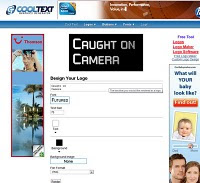
Changing the title font is an issue! Due to the transition we have chosen there is only one font the software allows us to use. Since others and ourselves are not happy with the font it provides we are trying to work around this. From the website http://www.cooltext.com we created the following image:


We plan to put this in the opening after the transition. The font we chose is what we feel most like the text that appears on CCTV cameras which is relevant to our documentary.

Unfortunately after trying this it didn't work as the gap between the transition and the image was a few second black screen which didn't look good. We decided to stick with the transition and leave the image.

Tuesday, 18 January 2011

The Opening Sequence

Here is the opening sequence completed. Unfortunately, as we didn't include parts from the storyboard and plan, it is shorter than we had originally planned. I feel that as it is shorter it keeps the audience enticed and gets straight to the point. We also replaced parts of the plan that were less obviously linked to CCTV such as including footage from the television show 'Big Brother'.

The Opening Voiceover


After having finished editing the transitions, videos and music of the opening it was time to finish it by adding the voiceov
er. After discussing with the rest of my group we decided that having a presenter could be a possibility when filming later interviews. We therefore decided that keeping the same voice throughout the documentary would keep a sense of continuity and it would seem more professional. We chose to use group member Cissie as the narrator as she is the most well spoken of us all with the most mature voice.
We had never used the school's microph
one before so we decided to make the most of the macbook's applications and tested it in GarageBand. The microphone had a mode specifically for voiceovers as it is a Yeti microphone. After adjusting the volume and a few tests of how close to be to the mic we were happy with the quality of playback.
From previous research we had done on the subject of CCTV we had a script prepared for the opening. We added more than enough facts to this script incase it was the original length we had planned - 30 seconds.

The voiceover was recorded straight onto iMovie and after testing it with different timings and saying different parts of the script with different sections of the opening we found what we thought was best. The final voiceover is on the video of the opening sequence which is in the post above.

Monday, 17 January 2011

Making the opening sequence

We had planned the opening sequence thoroughly including our powerpoint which is posted in a previous post and with a storyboard.

Using pictures we had taken at school and footage we previously filmed in London we began to edit the opening using the mac program iMovie. A large number of the shots were slightly shaky but using the stabilisation tool we were able to sort this out. We placed the clips in iMovie in a random order to add variety - for example; we didn't want two crowd shots next to each other. We sped up, cut, cropped and muted shots until we had a sequence we were happy with. One shot we were particularly happy with was a zoom in to a CCTV camera but unfortunately it was incredibly shaky. We then decided to re-film this shot at Weybridge station a few days later and edited it in. We were much happier with this shot and felt the sequence flowed nicely. Here is a screenshot of speeding up the new CCTV shot:


It was then time to add some transitions. From our previous knowledge of documentaries we had noticed a pattern - beginning with a cross blur. We took advantage of picking this up and added it to the beginning of our sequence so that it blurred into a shot of a crowd walking down oxford street. After testing a few transitions for the ending we found Lens Flare. This transition then leads to the title of our documentary 'Caught On Camera'.

Wednesday, 15 December 2010

Filming Schedule, Filming & More

As me and asia have jobs we felt it was important to make a filming schedule so that we knew when we were all availbale to film. The filming schedule will ensure we don't rush the filming as it is nicely spread out accross many dates. We also ensured we knew exactly where to film.


We took pictures of CCTV cameras all round our school. These will be useful for just putting in places of the documentary at a later date.


We filmed shots of CCTV in London - Specifically: Abbey Road and Oxford Street.

Inside the station we also filmed a television screen showing CCTV and another CCTV camera.


The shots filmed in London were unfortunately all shakey as we didn't take a tripod. Hopefully we will be able to edit this in iMovie. The shots in Oxford Street of the crowd (inspired by an image we found online) turned out well. We plan to speed up the pace though as the crowd was walking quite slowly. It shows the sheer amount of people in the street and the amount of people who are being caught on CCTV just by walking down a street in London. We planned to film in Abbey Road as we knew from a website online (http://www.camvista.com/england/london/beatles_abbey_road_webcam.php3) that there was CCTV there that was able to be viewed by anyone online. We thought we could use this in the documentary as it is quite a controversial thing to be happening.


There is also a peice of grafitti on a wall in London by the artist Banksy that we plan to use in the documentary that says "One nation under CCTV". It looks like this:


Friday, 5 November 2010

Presenting to the class

We made a powerpoint presentation with our ideas for the opening sequence of the documentary. This included images that looked like the shots we wanted which we found on google images. We then presented it to the class and filmed it. We hadn't informed the class of our idea before and we wanted feedback on it. We presented the powerpoint and then had a few minutes for people to ask questions and for us to answer them. The session was a success and we found it very helpful, especially as people liked and were interested by our idea. Just from this short powerpoint people were shocked by our topic.

Here is the powerpoint presentation that we used:

Wednesday, 22 September 2010

Practicing with the camera

Today in our lesson we got to practise interview techniques with a digital camera. Just using my group members we were able to film a few shots. To begin with we wrote down 3 questions - related to our topic of CCTV. We then wrote down shots we wanted to experiment with. These were:
1. Anonymous (where you do not see the person being interviewed's identity)
2. Two person shot (the interviewer and interviewee)
3. Interviewee talking (where you do not hear the question)
4. Just the interviewee (where you hear the question but do not see the interviewer)

We filmed these and made them into a short video which you are able to view below. I found this task very helpful as it showed what shots we wanted to use. For our documentary I feel that the anonymous style is not needed. I do feel that just the interviewee being in the shot is the best option.


Thursday, 16 September 2010

ITV Documentaries

Fearne and..
Today I watched a documentary on ITV called 'Fearne and...'. Each episode she meets a different celebrity and does a documentary on them including an interview. She is lucky as she is able to follow the celebrity during a normal day of their life with a camera man. Fearne Cotton is the presenter and she has done documentaries for ITV before including one about online ProAna websites which was very controversial and became a big topic in the news.
The episode I watched was on Perez Hilton. He owns a gossip website which puts up pictures of celebrity sitings and rumours. The structure of the documentary was very good beginning with Fearne explaining Perez Hilton and then his past. It included quotes, pictures and statistics on the screen while she commentated which was a very good technique as it kept the viewers interested.

Friday, 10 September 2010

Final documentary idea - CCTV


We then decided on the final idea - CCTV. We felt it was the most interesting for us and other people, especially in this day and age where it is being spoken about often in the press. We feel as it is such a controversial subject it will be a successful documentary.

Documentary Ideas


It was time to start planning our documentary so, as a group, we all contributed ideas of what the documentary could be about. There were loads which we put into a mind-map, we then discussed which were the best and most interesting as it is important we are interested in the subject. These ideas included:
Plastic Surgery
CCTV
Teenage Pregnancy
Dog Walkers (How dog owners look like their pets)
Wildlife in Weybridge
Rise in University Fees

Wednesday, 4 August 2010

BBC Documentaries


Channel 4 has been the main focus for my documentary research but other television companies and channels offer documentaries too. The BBC is an example of another one. Their documentaries are usually shown on their main channels BBC 1 and 2, and then shown often throughout the week on BBC 3 and online on their website: http://www.bbc.co.uk/iplayer


I have seen a few documentaries by the BBC such as 'Underage and Pregnant' and 'The world's strictest parents'. It is interesting to compare how different 'Underage and Pregnant' is to '16 and pregnant' by MTV which is filmed in america. The american ones seem to have alot more funding and editing involved, they are also more observational. The english documentaries although on the same topics are expository.


This is a screenshot of the opening editing of 16 and Pregnant:


This is a screenshot of the observational camera view of 16 and Pregnant:


Saturday, 17 July 2010

Fly On The Wall Documentaries

Fly On The Wall
The 'fly on the wall' style of documentary is mainly used in television. The name was formed as the filming is like the camera is a fly on the wall so what is being filmed is natural and not scripted or performed. The camera crew works unseen and unnoticeably. In some fly on the wall documentaries there is a voiceover or 'voice of god' edited in - usually using the voice of a character or someone mainly involved.


Examples of Fly on the Wall documentaries:

Big brother, I'm a celebrity get me out of here!, My super sweet 16, The Hills, Teen Mom, 16 and pregnant, The City.


Many fly on the wall documentaries such as 'The girls next door' end when the characters decide to take other routes in life away from the place and the people they've been filmed with. This often turns into more fly on the wall shows being made on the characters' new lives. 'The girls next door' branched off into 'Kendra' and 'Holly's world' which follows two of the girls' lives away from the playboy mansion where 'The girls next door' was filmed.